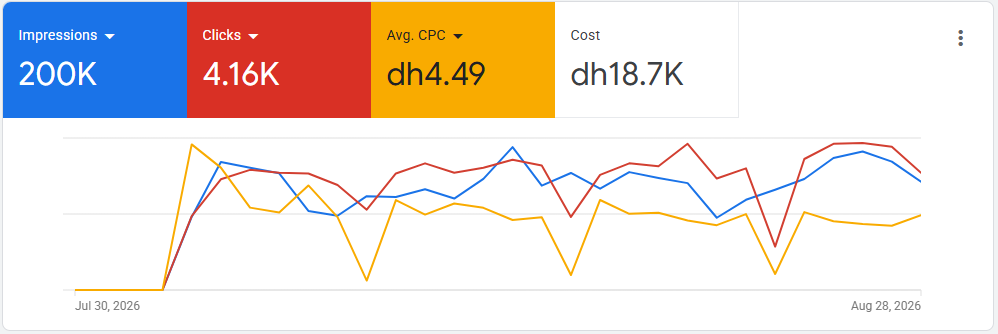
As a Google Ads specialist based in Dubai, I've spent years running campaigns for retail and e-commerce accounts, often where more than one storefront or brand is selling overlapping products. That setting forces a level of discipline that a single, simple account doesn't: campaign naming has to be consistent, negative keyword lists have to be shared deliberately, and someone has to keep an eye on Auction Insights so two campaigns from the same group aren't quietly out-bidding each other.
My day-to-day work covers Search, Shopping, Display, and Performance Max — building campaigns from scratch, auditing accounts that have grown messy over time, and keeping a constant eye on what the data is actually saying versus what the dashboard headline number implies.
A campaign that looks efficient in isolation can still be a net loss if it's cannibalizing traffic that would have converted anyway through another channel or campaign. I check for that before celebrating a good cost-per-click.
Search✦
Shopping✦
Performance Max✦
Display✦
Demand Gen✦
Video✦
App Campaigns✦
Search✦
Shopping✦
Performance Max✦
Display✦
Demand Gen✦
Video✦
App Campaigns✦
Core competencies
What this covers.
01
Campaign structure & account architecture
Organizing campaigns, ad groups, and naming conventions so performance can actually be read at a glance, especially across multiple brands in one account or MCC.
02
Search & Shopping campaigns
Building keyword-intent-matched Search campaigns and well-fed Shopping campaigns, with bidding strategies matched to the product margin and sales cycle.
03
Performance Max
Setting up PMax with proper audience signals and asset groups rather than letting it run as a black box — and knowing when it's the wrong tool for the goal.
04
Conversion tracking
Making sure conversion actions, GTM tags, and GA4 events are firing correctly before any optimization decision is made.
05
Auction Insights & cannibalization checks
Reviewing Auction Insights to catch internal competition between brand and non-brand campaigns, or between sibling storefronts in the same account.
06
Budget & bid management
Reallocating budget toward what's actually converting, and adjusting bidding strategy as an account matures rather than leaving it on autopilot indefinitely.
Tools & platforms
What I work with.
Google Ads
Google Ads Editor
Google Tag Manager
GA4
Google Merchant Center
Looker Studio
Google Ads Scripts
Campaign types
The campaign types
I structure most often.
Most accounts end up running a mix of these — the work is in deciding which combination fits the catalog, not running all of them by default.
Performance Max
An automated campaign type spanning Search, YouTube, Display and more from one setup. Useful for incremental reach, but only once it's fed clean audience signals and asset groups — not left to run on default settings.
Asset groups
Audience signals
Automated bidding
Search campaigns
Keyword-targeted text ads for high-intent queries — usually the foundation of an account, built around tightly themed ad groups and responsive search ads rather than one broad catch-all campaign.
High intent
Keyword-based
RSAs
Demand Gen
Image and video ads across YouTube, Discover and Gmail, aimed at building demand before someone is actively searching rather than capturing existing intent.
YouTube
Discover
Visual ads
Display campaigns
Banner-style ads across the Display Network, mostly used for remarketing to people who've already visited the site rather than for cold prospecting.
Remarketing
Display Network
Awareness
Shopping campaigns
Product listing ads pulled from a Merchant Center feed. Performance here lives or dies on feed quality and product grouping, more than on the bids themselves.
Merchant Center feed
Product groups
Price competition
Video campaigns
Ads that run on YouTube itself, used for everything from skippable in-stream ads to short-form bumper ads depending on the goal — reach, consideration or action.
YouTube
In-stream
Bumper ads
App campaigns
Promotes an Android or iOS app across Search, Play, YouTube and partner sites from a single campaign, with Google's algorithm handling placement and creative mix automatically.
App installs
Google Play
Automated placement
Common pitfalls
Common mistakes —
and the fix.
✕Mistake
Running every campaign type toward the same conversion goal.
✓Fix
Set conversion goals per campaign type. PMax often needs a different goal than a manual Search campaign, or the algorithm ends up optimizing for the wrong action.
✕Mistake
Letting sibling brands bid against each other.
✓Fix
Check Auction Insights regularly across every brand account. Sibling storefronts showing up against each other in the same auction wastes budget on both sides at once.
✕Mistake
Trusting the numbers before checking tracking.
✓Fix
Audit GA4 and conversion tracking before touching bids or budgets. Broken tracking makes every later optimization worse, not better.
✕Mistake
Treating Performance Max as set-and-forget.
✓Fix
Feed it clean audience signals and asset groups, and check search term insights regularly. PMax still needs structure — just less visible structure.
✕Mistake
Pausing underperforming keywords too early.
✓Fix
Give new campaigns enough data, usually two to three weeks, before cutting keywords that haven't had a fair chance to convert.
How I approach it
From audit to
ongoing measurement.
The exact steps shift depending on the brand and the platform, but this is the rough shape every project follows.
01
Audit the account
Review existing campaign structure, search terms, conversion tracking, and Auction Insights before changing anything.
02
Fix tracking first
Confirm conversions are tracked accurately — optimizing against broken data makes every later decision worse.
03
Restructure where needed
Reorganize campaigns and ad groups around real intent groups rather than however they happened to be built originally.
04
Launch or relaunch
Roll out Search, Shopping, or PMax campaigns with clear naming, negatives, and budget logic in place.
05
Monitor & report
Track performance against the original goal on a regular cadence, with plain-language reporting rather than just a metrics dump.
Good to know
A few things worth knowing
upfront.
Realistic expectations make for a much smoother project than optimistic ones. Here's what tends to actually happen.
💡
Results take a few weeks to stabilize
The first weeks of any campaign or restructure are mostly about gathering data, not judging final performance.
💡
Algorithms need volume
Smart Bidding and Performance Max need enough conversion data to optimize well — very low-volume accounts behave differently.
💡
The platform itself keeps changing
Google rolls out interface and policy changes regularly — today's best practice can shift without much warning.
💡
Budget caps what's possible
No amount of optimization replaces an under-funded budget in a competitive auction — structure helps efficiency, not magic.
💡
Tracking accuracy matters most
A flawless campaign sitting on broken conversion tracking still looks broken — that gets checked and fixed first, always.
💡
Seasonality moves the numbers too
Costs and competition shift with demand and the calendar, not just with whatever was changed in the account that week.
Common questions
FAQ
How long before I see results?
Most accounts need two to three weeks of stable data before performance is judged fairly — that's true whether it's a fresh account or a restructure of an existing one.
Do you manage the budget, or just recommend one?
I manage it directly once we've agreed on a number — allocating across campaigns, adjusting bids, and reallocating toward what's actually converting.
What if my account is already a mess?
That's the more common starting point, honestly. The first step is always an audit — structure, tracking, and Auction Insights — before anything gets rebuilt.
Do you work with multi-brand or multi-storefront accounts?
Yes — that's a large part of the work. Checking for cannibalization between sibling brands in the same account is one of the first things I look at.
Let's work together
GOT AN ACCOUNT
THAT NEEDS STRUCTURE?
Tell me what's running today and where it's stuck — I'll tell you what an audit would actually look at.
Start a conversation ↗